
Images have the power to increase engagement with your written content and help your brand tell its story well. Including alt text in your images when adding them to your website can improve on-page SEO and improve accessibility for people utilizing a screen reader.
How Alt Text Impacts SEO

Alt text is a text description for an image. It describes the purpose of the image, allowing Google to understand the contents of the image so it can rank better in Google Images. Including alt text also gives Google context for what the rest of your webpage is about, which can help on-page SEO.
Be Specific When Writing Alt Text
Since alt text provides context for what your image is about, be specific when writing and intentional when using keywords. There’s no need to start the description with, “image of…” Instead, jump right into the description. For example, if writing alt text for this image of cupcakes:

Okay Alt Text: Cupcakes
Good Alt Text: Vanilla cupcakes with vanilla frosting and colorful sprinkles
The difference between okay and good alt text is in the details…
How to Add Alt Text in WordPress

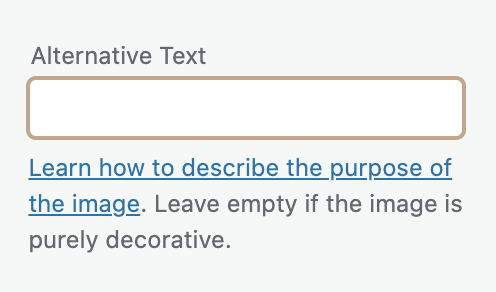
If adding alt text in WordPress, after you’re logged in, go to the “Media” tab found in the WordPress Dashboard. If you click on an image in your image library, you can edit the alt text from there.
Image SEO Best Practices

Google Search Central has advanced SEO documentation, which provides guidelines on how to improve image SEO for Google Images. These include:
Build a strong user experience.
Use images that provide value to the webpage and relate to your written content. Don’t embed important text elements in images. Instead, keep your text elements in HTML. Google Images is primarily used on mobile devices, so optimize your website design for mobile to provide a great user experience.
Optimize page titles and descriptions.
Write your page titles and descriptions based on user intent. Think about what goals the user may have, whether that’s finding information on a topic or making a purchasing decision.
Decrease page load time.
Reducing file sizes will improve page speed and provide a better user experience.
If you’re building a WordPress website, Smush is a plugin you can use to compress images and optimize them for lazy load. If a user has poor wifi connection and is having trouble loading images, alt text allows them to understand the contents of the image.
Use high-quality images.
High-resolution images are more appealing to users and will drive more traffic to your website if a user discovers your images through Google Images.
Use descriptive file names and captions.
Your file names and captions should describe the contents of your images, since Google also uses this information to understand your images and webpages.
Use supported image formats.
Google supports JPEG, PNG, GIF, SVG, WebP, and BMP files.
We hope these tips help you understand how to write effective alt text so you can improve your SEO. If you’re interested in finding more ways to improve your SEO, reach out to Deal Digital today.